
One help center for customers, agents and AI
Write the answer once. Customers find it on their own, agents send it in one click and AI agents answer with it. With your brand, on your domain.
7-day free trial, no credit card required.

One knowledge base: write it once, everyone gets the answer
In most companies, only customers read the help center. In Talqui, the same article serves whoever asks, whoever answers, the AI that replies on its own and the team that needs to check a detail.
- Customer
Anytime, on any device, without opening a ticket. The best support conversation is the one that never had to happen at all.
- Agent
In the reply box, the Articles tab lists your help center by category. The agent finds the right article and sends the link without switching tabs.
- AI agent
Talqui's AI agents read your help center and answer customers with the details in your articles, not with a generic reply.
- Team (MCP)
New hires learn and experienced people check a detail. Through an AI assistant connected via MCP, the team asks and the help center answers.
Help articles written by your AI assistant, via MCP
Your help center speaks MCP, the open standard that lets AI assistants use tools. Connect Claude, ChatGPT or another compatible assistant and ask in plain words.
- Write an article about a feature, a policy or a process
- Update one section of an article without touching the rest
- Create and organize categories
- Look up what the help center already says about a topic
Write an article in our help center explaining how to schedule a campaign and how to cancel a send. Use the Campaigns category and keep it as a draft.The address and the credential are in the MCP tab of your help center, inside Talqui.
Nothing goes live by accident: everything starts as a draft, and only publishing changes what customers see.
See Talqui plugins and MCPEvery new question makes it less likely you'll hear it again
When a customer asks something the help center doesn't answer yet, the article is born right there, written by AI via MCP. The link goes to the customer, and the next person finds the answer ready.
- 01
A customer asks
The question comes in through WhatsApp, chat or email.
- 02
No article yet
The help center has no complete answer to it.
- 03
AI writes it via MCP
The assistant creates the article, with screenshots and video when needed.
- 04
The link goes to the customer
They get a better answer than a typed reply.
- 05
Next time, already answered
The customer finds it, the agent sends it and the AI answers with it.
How we do it at Talqui
That is how we run our own: a repeat question without a complete answer becomes an article on the spot, and the link goes to the customer.
Signals of what is missing
See the views of each article. At the end of every article, readers say whether it helped and can tell you what was missing.
A help center with your brand and your own domain
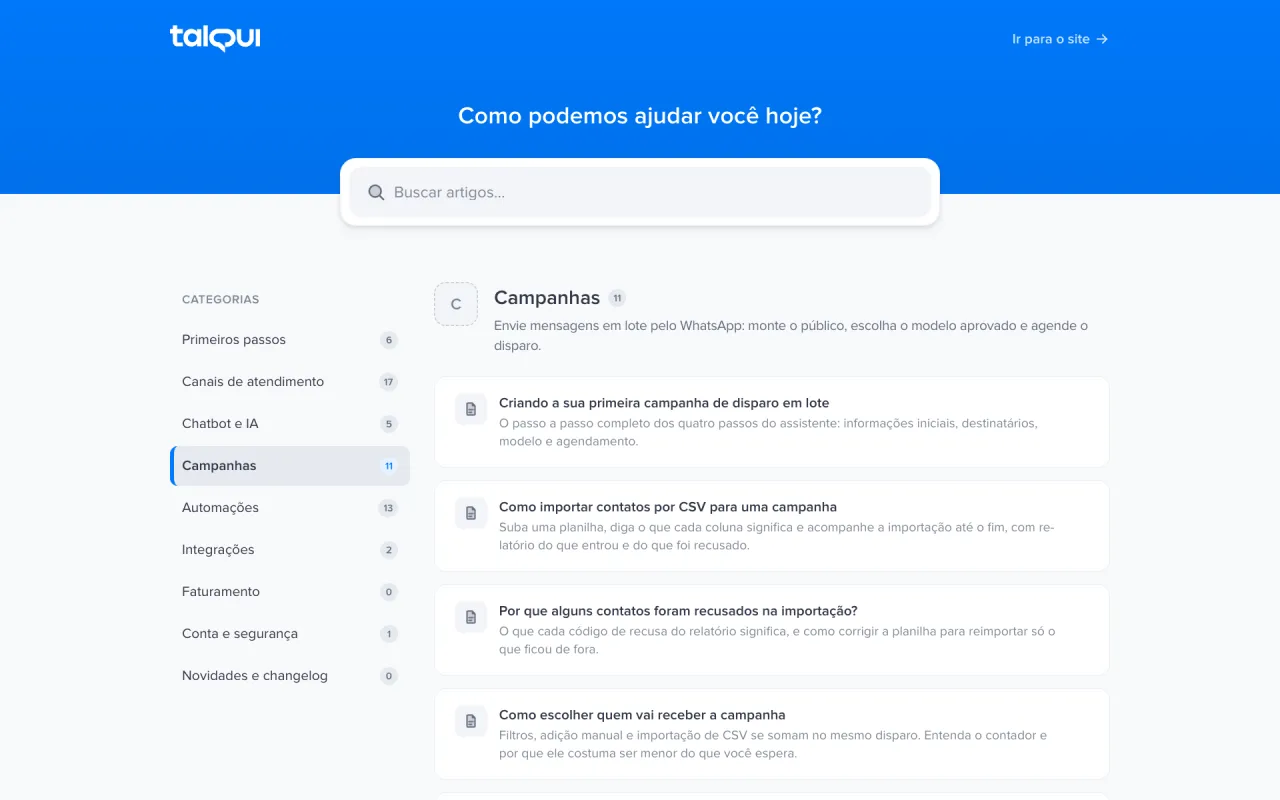
Pick the colors, logo, favicon and header line. Point a CNAME and your help center answers on your company's domain, with HTTPS.
And everything a help center needs comes built in
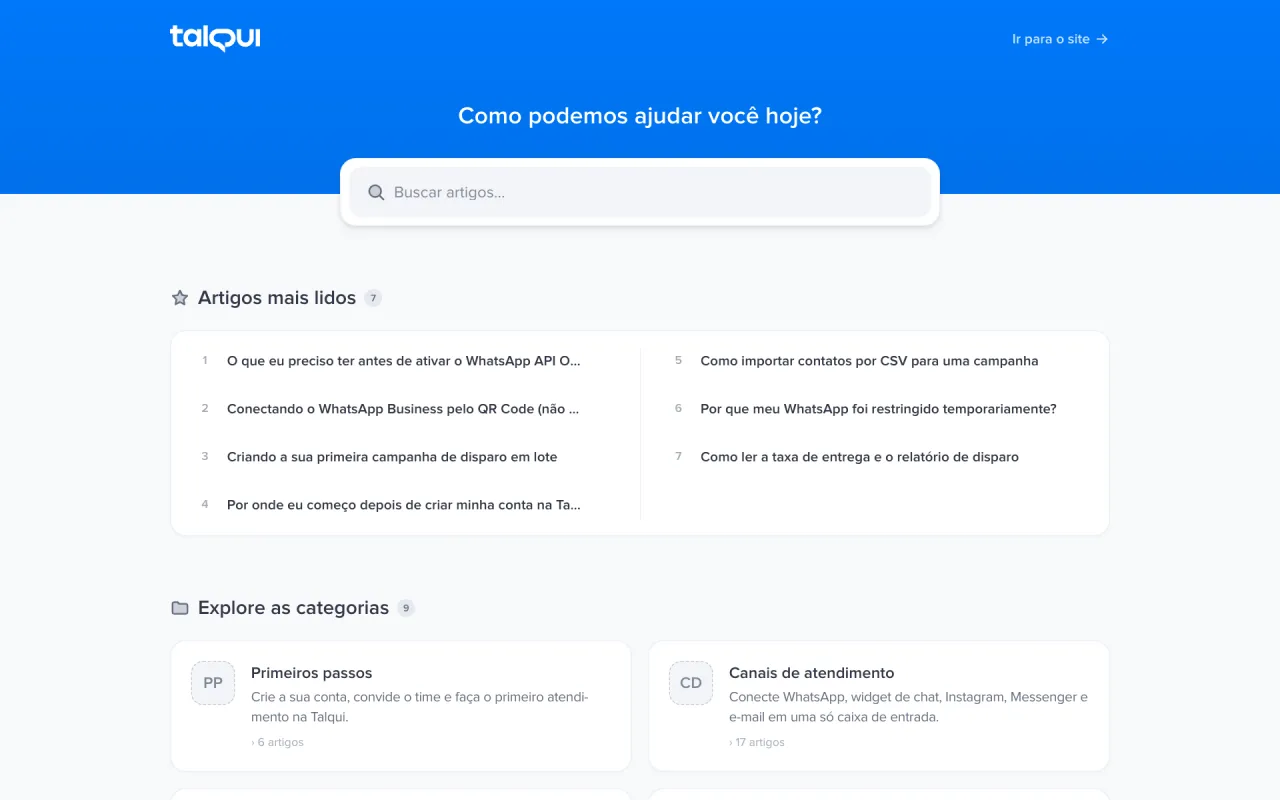
- Search as you typeResults show up with every letter, without leaving the page.
- Built for GoogleEvery article is a page, with sitemap and structured data generated for you.
- A share image per articleEach article gets its own image for social networks and messages.
- Links that don't breakChanged an article's address? The old one redirects to the new one.
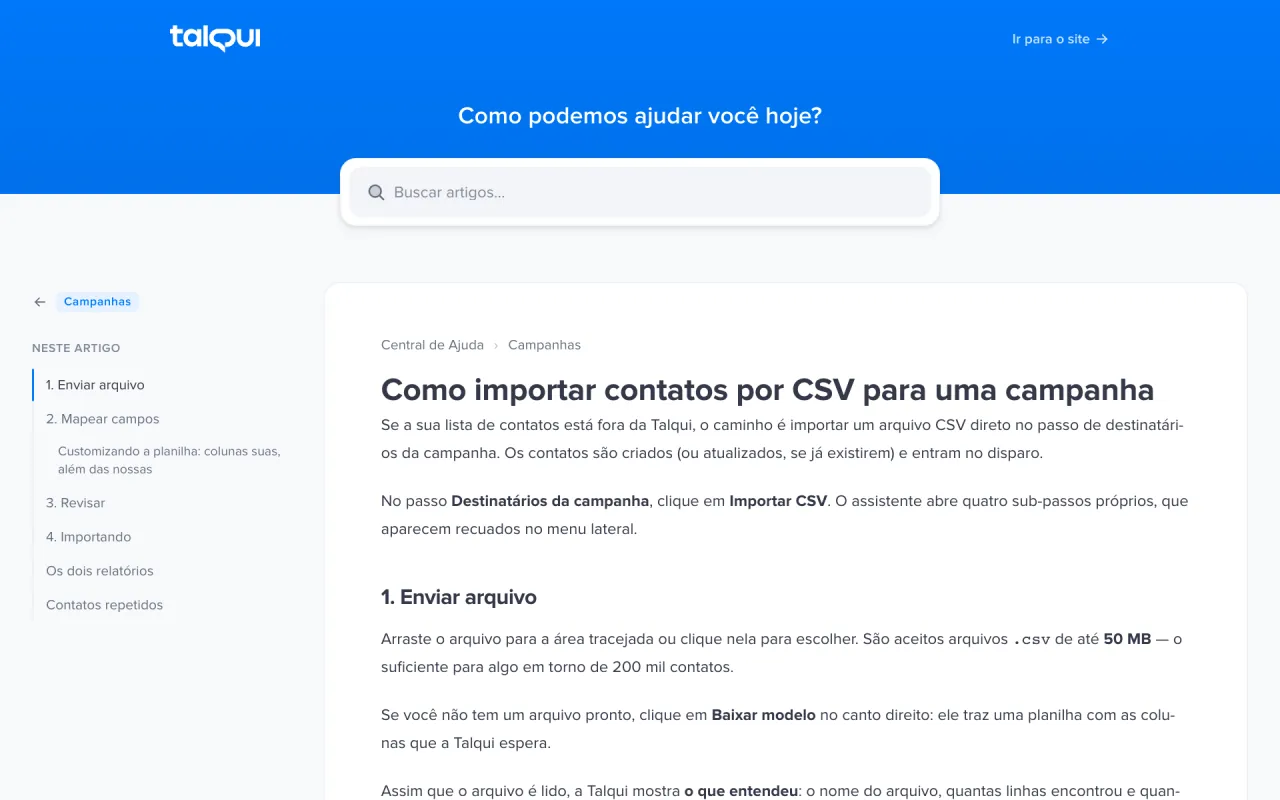
- Visual editorHeadings, lists, tables, callouts, images and videos, no code.
- Draft before liveEvery article starts as a draft. Unpublish or archive it anytime.
Write, publish and answer
From the editor to your own domain, from AI writing via MCP to the article sent in a conversation: the whole loop in one video.
Our own help center runs on this product
ajuda.talqui.chat serves Talqui's customers in Brazil, in Portuguese. It is written and maintained with the MCP you saw above.
FAQ
Questions about the help center
What is the Talqui help center?
It is a public knowledge base, with articles and categories, that you create and maintain inside Talqui. Customers find answers on their own, agents send the articles in conversations and AI agents answer with them.
Can I use my company's domain?
Yes. Add a subdomain such as help.yourcompany.com, point a CNAME and verify it in the dashboard, with HTTPS. Until then, the help center already works on a Talqui address with the name you choose.
Do I need to code to write articles?
No. The editor is visual, with headings, lists, tables, callouts, images and videos. If you prefer, ask an AI assistant to write the articles via MCP.
Which AI assistants work with the help center MCP?
Any assistant that supports MCP, such as Claude and ChatGPT. It can write, update, organize into categories and look up articles. Everything starts as a draft and only goes live when the article is published.
How does my team use the articles in support?
In the reply box of any conversation, the Articles tab lists the help center by category and has search. The agent opens the article to check it and sends the link to the customer in one click.
Do AI agents use the help center to answer?
Yes. Talqui's AI agents read your help center articles and answer with the details in them. Every published article makes the AI more accurate.
Do the articles show up on Google?
Yes. Every published article is its own page, with sitemap, structured data and a share image generated automatically.
How do I know if an article is helping?
The article list shows the views of each one. At the end of every article, readers say whether it helped and can tell you what was missing.
Everything for support and sales in one place
The help center is one part of Talqui. The same contacts, the same team and the same articles run through every feature.
- Shared inboxWhatsApp, Instagram, Web Chat and other channels on one screen, with queues, teams and many agents.Discover
- AI agentsThey answer with your help center articles and hand over to the team when a case needs a person.Discover
- WorkflowsTriggers, conditions and steps in a visual editor for tags, transfers and follow-ups.Discover
- Chatbot StudioMenus and questions built without code, which can start a workflow mid-flow.Discover
- WhatsApp to Web ChatMove long conversations to Web Chat with a link and stop paying per service message.Discover
- Support analyticsVolume, response time and satisfaction by channel and team.Discover